SQLinForm SQL Formatter
Community Discussion Forum
SQLinForm SQL Formatter
I'm trying to configure the formatter so that short IIF functions stay on a single line in SELECT clauses when they're under the max character limit (e.g., 120 chars).
SELECT
    JournalId = jr.JournalId
    ,Flag1 = IIF(jr.ExpenseTransactionId IS NOT NULL
                 ,'Y', 'N')
    ,Flag1 = IIF(jr.id2 IS NOT NULL
                 ,'Y', 'N')
    ,Flag3 = IIF(jr.id3 IS NOT NULL
                 ,'Y', 'N')
    ,FinCDType = IIF(jr.JournalAmountGBP >= 0
                     ,'CREDIT', 'DEBIT')

FROM Treasure.Journal jr

/*------------------------------------------------------------
--expected behaviour
SELECT
    JournalId = jr.JournalId
    ,Flag1     = IIF(jr.ExpenseTransactionId IS NOT NULL,'Y', 'N')
    ,Flag1     = IIF(jr.id2 IS NOT NULL,'Y', 'N')
    ,Flag3     = IIF(jr.id3 IS NOT NULL,'Y', 'N')
    ,FinCDType = IIF(jr.JournalAmountGBP >= 0,'CREDIT', 'DEBIT')

FROM Treasure.Journal jr
*/------------------------------------------------------------
I found the solution by myself for iif:
In MyLists: add iif into and set line to 10, next lines: 1
However, there is stillan option that some built-in function has the similar multi-line behaviour without. I'd recommend creating a dedicated "built-in function" setup.
Sorry, I have one more if, isnull or built-in function strange behaviour.
msql, profile:jr6

SELECT
    LocalAmount       = @AmountOnAccount
   ,LocalCurrencyCode =
    (
        SELECT a.CurrencyCode FROM Treasure.Account a WHERE a.AccountId = @AccountId
    )
   ,DescriptionMain = IIF(ISNULL(@Description1, '') != ''                                                                                                             ,@Description1 , '') + IIF(ISNULL(@Description2, '') != '' ,' | ' + @Description2 , '') + IIF(ISNULL ( @Description3 ,'') != '' , ' | ' +
                                                                                                                                                        @Description3 ,'')


/*------------------------------------------------------
-- expected behaviour

-- one of the option when the code is not too long for one line
 SELECT                                                                                                                                                      SELECT
    LocalAmount       = @AmountOnAccount
   ,LocalCurrencyCode =
    (
        SELECT a.CurrencyCode FROM Treasure.Account a WHERE a.AccountId = @AccountId
    )
   ,DescriptionMain   = IIF(ISNULL(@Description1, '') != '', @Description1 , '') + IIF(ISNULL(@Description2, '') != '' ,' | ' + @Description2 , '') + IIF(ISNULL ( @Description3 ,'') != '' , ' | ' + @Description3 ,'')


-- I can force the structure manually, but the equal signs are not aligned. It works with the profile jr6:
SELECT
    LocalAmount       = @AmountOnAccount
   ,LocalCurrencyCode =
    (
        SELECT a.CurrencyCode FROM Treasure.Account a WHERE a.AccountId = @AccountId
    )
   ,DescriptionMain = IIF(ISNULL(@Description1, '') != '', @Description1         , '') --
    + IIF(ISNULL(@Description2, '') != ''                ,' | '  + @Description2 , '') --
    + IIF(ISNULL ( @Description3 ,'') != ''              , ' | ' + @Description3 ,'')  --


--IDEAL SOLUTION, including subselect in round brackets. All calculations are to the right from the aligned equal signs :)
-- if necessary some forced manual formating in the maths or concatenations is OK to deal with any type of operators and not to overcomplicate the formatting code
SELECT
    LocalAmount       = @AmountOnAccount
   ,LocalCurrencyCode =
                        (
                            SELECT a.CurrencyCode FROM Treasure.Account a WHERE a.AccountId = @AccountId
                        )
   ,DescriptionMain   = IIF(ISNULL(@Description1, '') != '', @Description1, '')
                        + IIF(ISNULL(@Description2, '') != '',' | '  + @Description2 , '')
                        + IIF(ISNULL (@Description3 ,'') != '', ' | ' + @Description3 ,'')
------------------------------------------------------*/
Thank you for your reply. Is there any chance of implementing the ideal solution as per the sample below?
--IDEAL SOLUTION, including subselect in round brackets. All calculations are to the right from the aligned equal signs :)
-- if necessary some forced manual formating in the maths or concatenations is OK to deal with any type of operators and not to overcomplicate the formatting code
SELECT
    LocalAmount       = @AmountOnAccount
   ,LocalCurrencyCode =
                        (
                            SELECT a.CurrencyCode FROM Treasure.Account a WHERE a.AccountId = @AccountId
                        )
   ,DescriptionMain   = IIF(ISNULL(@Description1, '') != '', @Description1, '')
                        + IIF(ISNULL(@Description2, '') != '',' | '  + @Description2 , '')
                        + IIF(ISNULL (@Description3 ,'') != '', ' | ' + @Description3 ,'')

I will need to add "+" as a Concat Operator similar to the existing "||". I need to investigate.
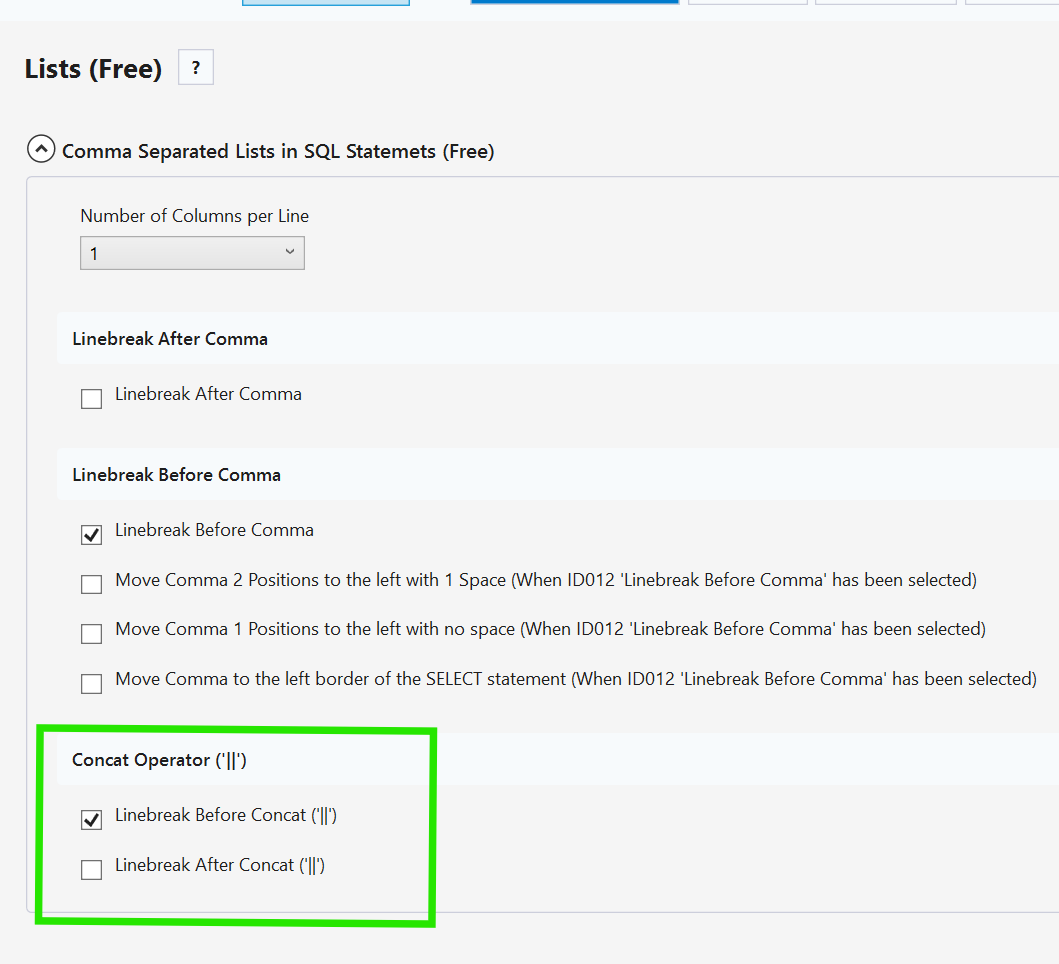
For now profile 6 is probably the best work-around
Regards
Guido
Thank you. However, the + sign LineBreak before is a nice-to-have. The main issue is a large empty space in the column calculation/function. Please see the screenshot.

please try this
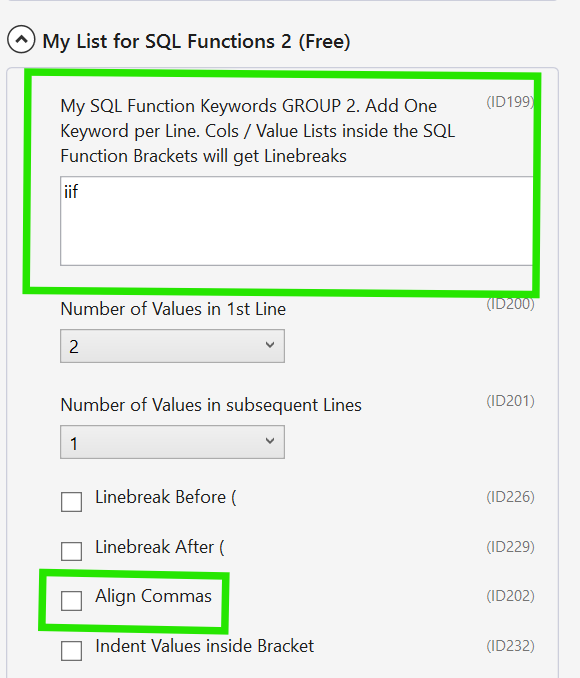
Thanks, I used. It's better. But for the purpose of this exercise, I added more parts into the concatenation 😁, and it's sort of quirky. Please see the screenshot below in SSMS22
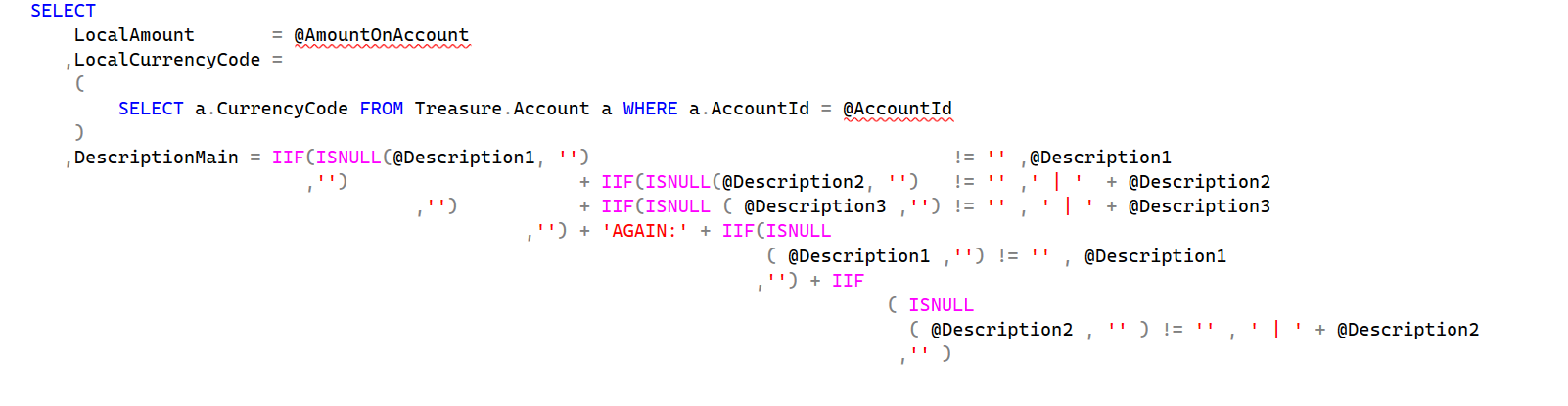
The standalone Win SQLinFORM app shows a different result, and this one is more suitable for formatting:

Profile file is attached:
Ok, I will check this tomorrow. Both the standalone app and SSMS use the same parser. Interesting!
Hi @kmpel,
please uncheck these 2 options to make it more compact
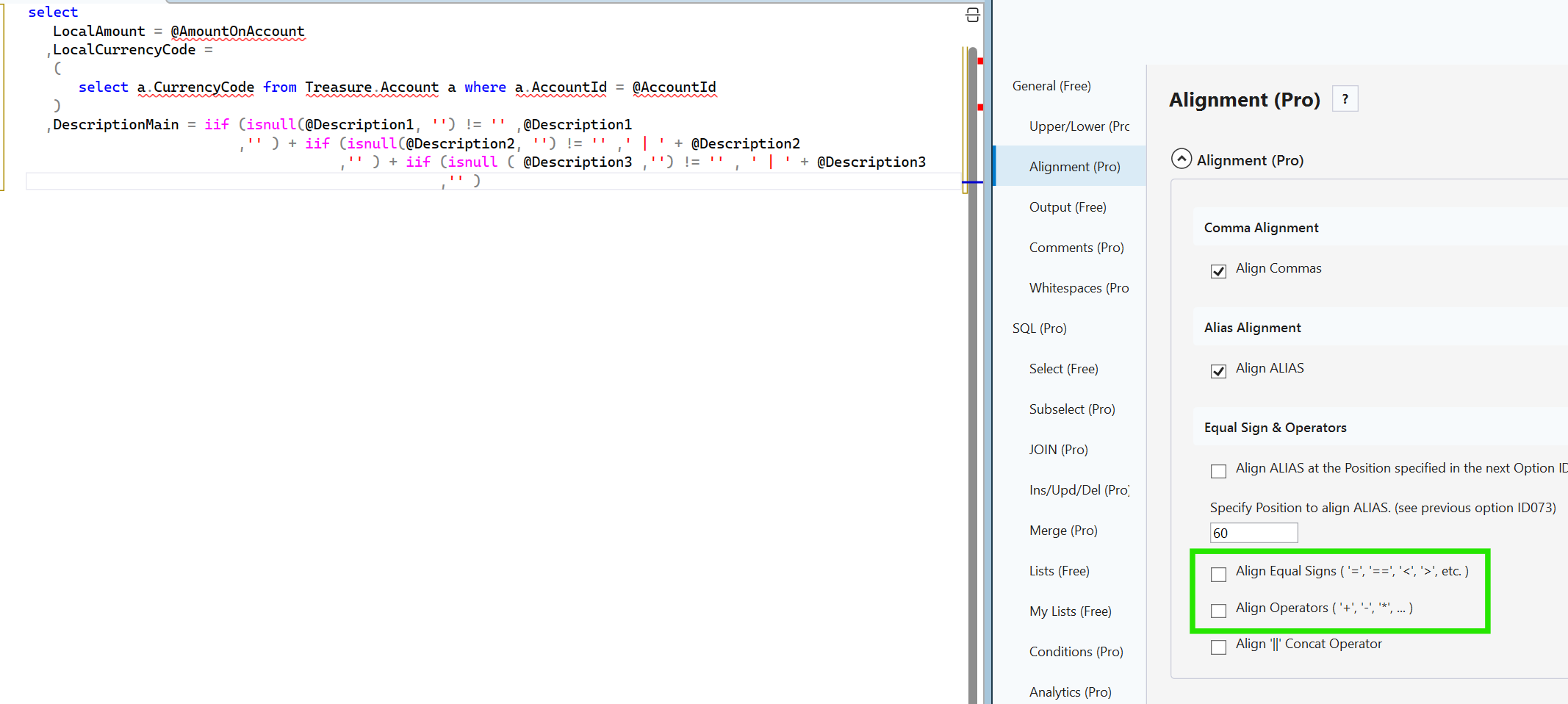
The current logic for indention for functions is to indent on the open bracket level. As the IIF functions move to the right in your statement, the indentions are also moving to the right. The formatting is therefore working correctly. but it does not mean when something works correctly that it is nice. Therefore I am thinking about special formatting / indention rules for iif functions. I am open for any suggestion. One idea of mine was to put a line-break before the "+".
REgards
Guido
Hi Guido, thank you for working on this. I check it out. I think working out when to align operators, such as the plus sign (+), is a tough logic problem. In my opinion, the way is to 1) use the equal sign as an assignment operator only to align; the equal sign as a comparator to never align. 2) Keep the function with its rounded brackets together. 3) Leave the developer manually format to represent the logic. I think it's better to leave the developer to define the structure of the logic rather than guessing his/her way of thinking and force it into some general structure 😉
I think one good option is what you already have, FORMAT_ON/OFF. I'd also suggest a COLFORMAT_OFF in this case, one line for the select clause whihc is quite important in SQL. Please see my sample below.
SELECT
    LocalAmount       = @AmountOnAccount

    --Still strange formatting; difficult to understand the logic
   ,DescriptionMain = IIF(ISNULL(@Description1, '')                      != '', @Description1
                         ,'')           + IIF(ISNULL(@Description2, '')  != '',' | '  + @Description2
                                   ,'') + IIF(ISNULL (@Description3 ,'') != '', ' | ' + @Description3
                                             ,'')
    --FORMAT_OFF
   ,DescriptionMainFormanOff    =   IIF(ISNULL(@Description1, '') != '', @Description1, '')
                                  + IIF(ISNULL(@Description2, '') != '',' | ' + @Description2 , '')
                                  + IIF(ISNULL(@Description3 ,'') != '',' | ' + @Description3 ,'')
    --FORMAT_ON


/*
--Suggested behaviour: when row is followed by a comment do not format this column calculation
   ,DescriptionMainRowComment   =   IIF(ISNULL(@Description1, '') != '', @Description1, '')          --COLFORMAT_OFF
                                  + IIF(ISNULL(@Description2, '') != '',' | ' + @Description2 , '')
                                  + IIF(ISNULL(@Description3 ,'') != '',' | ' + @Description3 ,'')
*/
Hi @kmpel, very interesting idea! Will check how to include this option
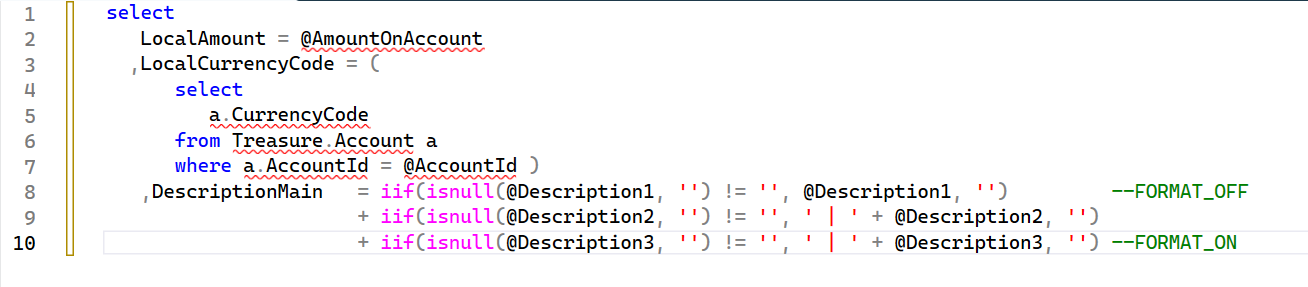
Already now, you can add --FORMAT_OFF and --FORMAT_ON at line-end, and it will format like this