 SQLinForm SQL Formatter
Community Discussion Forum
SQLinForm SQL Formatter
Hi, when I use SELECT TOP, the first column is immediately after the TOP clause. How can I have it below SELECT? Also, it would be amazing if the first column_name is aligned (one character to the right) with the rest of the columns, which have a comma as the first character. Please see the code and expected behaviour below.
Thank you
DECLARE @TopCount INT = 300

SELECT TOP (@TOPCOUNT) JournalId = jr.JournalId
    ,CategoryId                  = jr.CategoryId
    ,AccountTransactionId        = jr.AccountTransactionId
    ,ExpenseTransactionId        = jr.ExpenseTransactionId
FROM schema.table jr

SELECT TOP 300 JournalId  = jr.JournalId
    ,CategoryId           = jr.CategoryId
    ,AccountTransactionId = jr.AccountTransactionId
    ,ExpenseTransactionId = jr.ExpenseTransactionId
FROM schema.table jr


SELECT
    JournalId             = jr.JournalId
    ,CategoryId           = jr.CategoryId
    ,AccountTransactionId = jr.AccountTransactionId
    ,ExpenseTransactionId = jr.ExpenseTransactionId
FROM schema.table           jr


/*------------------------------------
--expected behaviour

DECLARE @TopCount INT = 300

SELECT TOP (@TOPCOUNT)
     JournalId            = jr.JournalId
    ,CategoryId           = jr.CategoryId
    ,AccountTransactionId = jr.AccountTransactionId
    ,ExpenseTransactionId = jr.ExpenseTransactionId
FROM schema.table jr

SELECT TOP 300
     JournalId            = jr.JournalId
    ,CategoryId           = jr.CategoryId
    ,AccountTransactionId = jr.AccountTransactionId
    ,ExpenseTransactionId = jr.ExpenseTransactionId
FROM schema.table jr


SELECT
     JournalId            = jr.JournalId
    ,CategoryId           = jr.CategoryId
    ,AccountTransactionId = jr.AccountTransactionId
    ,ExpenseTransactionId = jr.ExpenseTransactionId
FROM schema.table           jr

*//*------------------------------------
The recent 2026-01-29 version moves the first column to the second row. But Top N stays before the column name, which is less readable. Is there any chance to keep TOP N after the SELECT and move the first column to the next row, please?
DECLARE @TopCount INT = 300

SELECT
    TOP (@TopCount) JournalId = jr.JournalId
   ,CategoryId                = jr.CategoryId
   ,AccountTransactionId      = jr.AccountTransactionId
   ,ExpenseTransactionId      = jr.ExpenseTransactionId
FROM schema.table               jr


/* SUGGESTED BEHAVIOUR

DECLARE @TopCount INT = 300

SELECT TOP (@TopCount)
    JournalId            = jr.JournalId
   ,CategoryId           = jr.CategoryId
   ,AccountTransactionId = jr.AccountTransactionId
   ,ExpenseTransactionId = jr.ExpenseTransactionId
FROM schema.table          jr

*/

Hi @kmpel,
will investigate with the linebreak before TOP keyword.
For the alignement of the 1 column with the comma of the following lines please try these options inthe Lists Tab
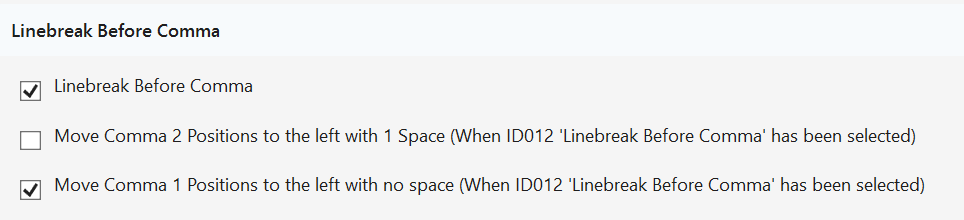
the bug with the linebreak after top keyword was a typo in my regex 🙁
Please downoad ssms22 Installer Release 2026.02.01.2
