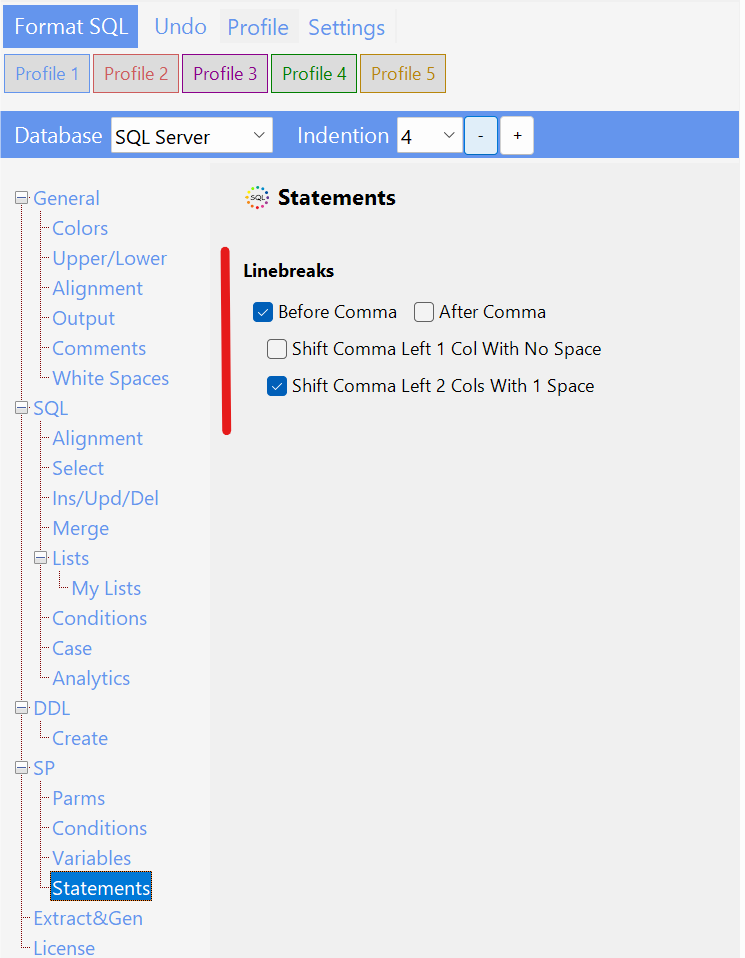
Thanks for the reminder. In SQL Sever I can see 3 different statements where the comma rule would apply
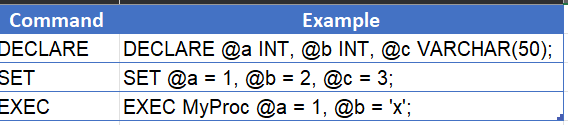
Do you see any other statment where the comma linebreak rule could be applied?
 SQLinForm SQL Formatter
Thanks for the reminder. In SQL Sever I can see 3 different statements where the comma rule would apply
Do you see any other statment where the comma linebreak rule could be applied?

For SQL Server...
Those are the "only" ones I could think of/find. Yes, most of the rest of them are already covered somewhere, but wanted to be as complete as I could. 🙂
There are much more specific ones like CREATE INDEX, etc., but those are a pain no matter what. (I just put --FORMAT_OFF / --FORMAT_ON around them. <chuckle>)
Back to you! 🙂
Michael
OK, thanks. First tests ran fine. I will try to improve the indentions which looks sometimes ugly, when there are only 2 vars
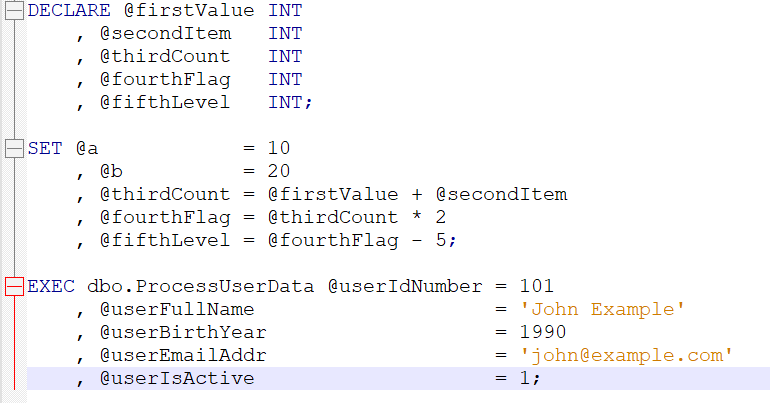
Sounds like a plan. Thank ya much!! 🙂
Michael
Hi,
the new release is available for Download with a few new options