[Solved] Turn off highlighting of edited lines

10 Posts
3 Users
0 Reactions
4,346 Views
Posts: 5
Topic starter
(@smithdad62)
Member
Joined: 4 years ago
[#44]

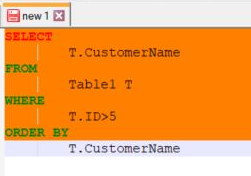
I'm trying to use SQLInForm and I cannot seem to find the setting to turn off the bright orange highlighting of modified lines as shown in the link below.  I can change Setting Color Style to "Notepad++ SQL" but then I lose the keyword formatting for the different categories of keywords. SQLInForm is the only plugin I have installed at the moment for N++.

https://imgur.com/a/C3MJ9EY


9 Replies
Guido
Posts: 295
Admin
(@admin)
Member
Joined: 5 years ago

Hi SmithDad62,

thanks for your post. I will investigate where these orange lines come from

grafik

Regards

Guido


Reply
Guido
Posts: 295
Admin
(@admin)
Member
Joined: 5 years ago

Hi SmithDad62,

I can reproduce this issue with N++ 8.4.6 32 bit version. Which N++ version do you use?

Regards

Guido


Reply
Posts: 5
Topic starter
(@smithdad62)
Member
Joined: 4 years ago

v8.4.6 64bit version


Reply
1 Reply
Guido
Admin
(@admin)
Joined: 5 years ago

Member
Posts: 295

@smithdad62 

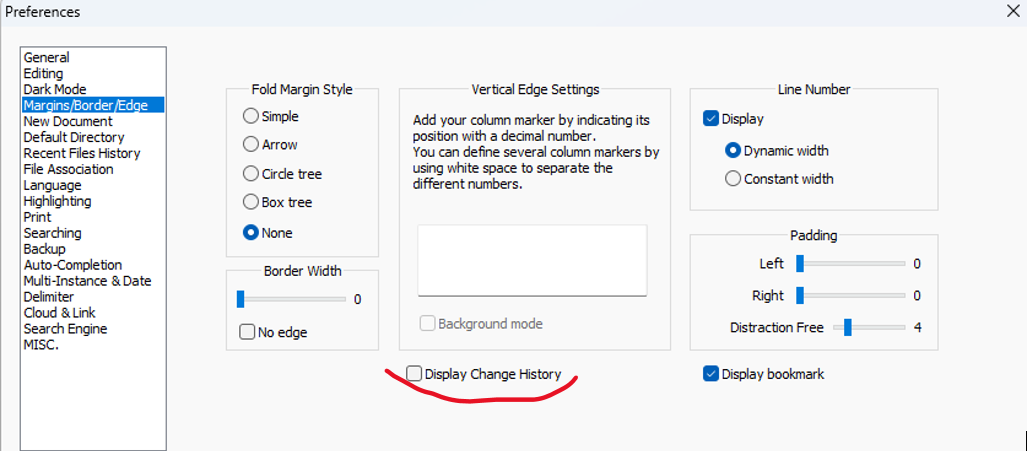
it looks like there is a new feature in N++ 8.4.6  which is called "Display Change History". Please switch it off and give it a try.

grafik

This new feature is discussed here: N++ 8.4.6 "Print black on white" vs "Display Change History"


Reply
Posts: 5
Topic starter
(@smithdad62)
Member
Joined: 4 years ago

That's exactly what it was thank you very much!  


Reply
Page 1 / 2
Share: