@na5772, many thanks for your feedback. This is of great help.
Will also do some investigations
Regards
Guido
 SQLinForm SQL Formatter
@na5772, many thanks for your feedback. This is of great help.
Will also do some investigations
Regards
Guido

I have the same issue.
first it was a problem on reading writing in the directory, nothing happened, now with write permission, the SQL disappears.
i put everythin in c:\tmp to avoid problems with directory acces and reading /writing rights
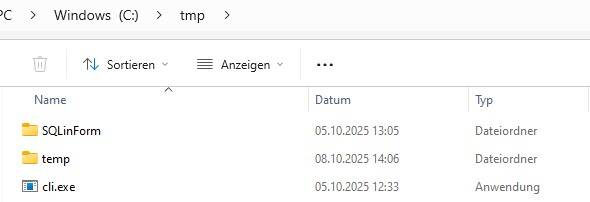
cli.exe is in c:\tmp\
and there is a directory C:\tmp\SQLinForm where profile1_work.json.log is written to.
so command line is
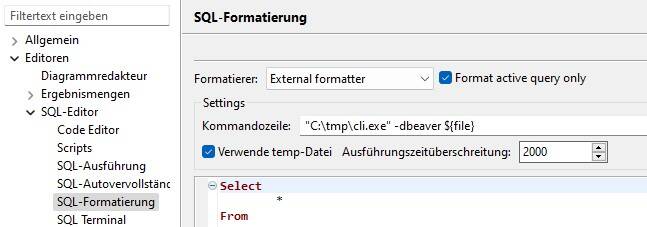
"C:\tmp\cli.exe" -dbeaver ${file}
log is
08.10.2025 12:40:06
------------------------------
Number of args passed: 2
Args : -dbeaver
Read file failed : C:\tmp\SQLinForm\dbeaver.json${file}
Input FileName: ${file}
Output FileName: ${file}
Profile FileName: C:\tmp\SQLinForm\profile1_work.json
Read file failed : ${file}
Read input file failed
*
i have a symbolic link in the directory
C:\tmp\SQLinForm\
but whatever i do, making a link called dbeaver.json${file} which points to
C:\tmp\SQLinForm
or to
C:\tmp\SQLinForm\dbeaver.json
or to
C:\tmp\SQLinForm\dbeaver.json${file}
and no matter where i put a file ${file}
in
C:\tmp\SQLinForm\
or
C:\tmp\SQLinForm\dbeaver.jsondatei${file}
and pointing the link to this file
or pointing the link to the directory
I get the above error. So how has the link to be configured. Name of the link Source / Target of the link
by the way: Notepad++ formatter works , so i get the sql formatted....

Hi @na4711,
thanks for your feedback.
Is the formatting working when you do not work with links?
Could you please post a screenshot from c:\tmp directory and from s:\tmp\SQLinForm directory
Regards
Guido