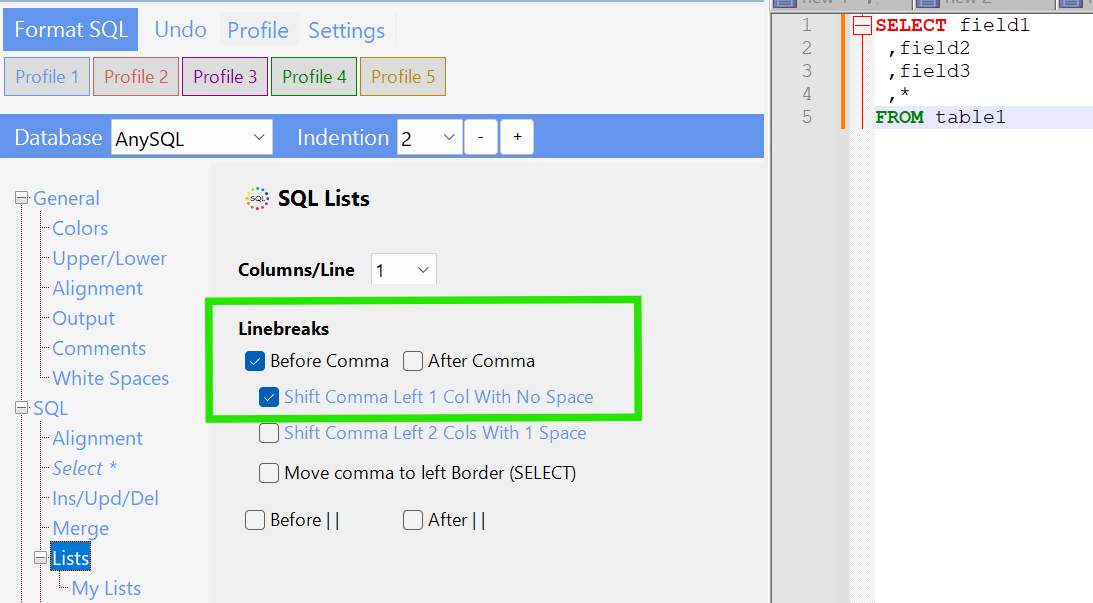
Im new to this but I believe I have all my settings correctly configured to create the output I want.
Here is my input query:
SELECT field1 ,field2, field3 , * FROM table1
And my output looks like this
SELECT field1
    , field2
    , field3
    , *
FROM table1
Where I want to see this (without the space)
SELECT field1
    ,field2
    ,field3
    ,*
FROM table1
Here are the settings I currently have configured which seem relevant to this conversation:
- General -> General Indentation = 4
- General -> Alignment -> Align Comma = checked
- General -> White Spaces -> White Spacces (typo) -> Around Commas = No Spaces
- General -> White Spaces -> Remove unnecessary White Spaces = checked
- SQL -> Alignment -> Indentaion = General Indentation
- SQL -> Select -> I dont think my configuration issue has to do with these settings
- SQL -> Select -> Lists -> Linebreaks -> Before Comma = checked
- My version: SQLinFormDesktop: 6.25.5.18 - Parser 6.25.05.18
Also, when I execute this on the SQLinForm Desktop it works just the way I want it. However, when I execute this on SSMS is when my spacing problem shows up.
Any thoughts?